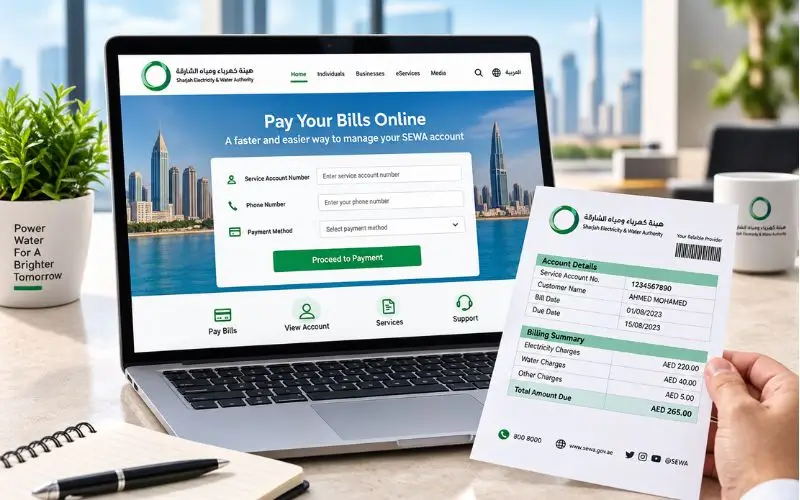
SEWA Quick Payment, paying electricity, water, and gas bills in Sharjah has been made easier, with customers being able to pay their bills without having to visit the customer service centre. An online payment system allows users to confirm their account, check the total they must pay, and pay online. It is especially helpful to customers who wish to pay an outstanding bill in a timely manner, wherever they are. Typically, users will need to have their SEWA service account number and registered contact number. The process is very simple,e and there are various payment options available to customers who qualify. This guide will help you understand how the online payment process works, what information you require, and how to handle any payment issue.
SEWA Payment Details
| Item | Details |
| Authority | Sharjah Electricity, Water and Gas Authority (SEWA) |
| Services | Electricity, Water & Gas |
| Payment Type | Online / One-Time Payment |
| Required Information | Service Account Number & Contact Number |
| Payment Options | Visa, MasterCard, Debit Card & other supported methods |
| Customer Service | 600 566665 |
| Emergency Number | 991 |
| Official Website | SEWA e-Services |
What Is SEWA Quick Payment?
SEWA Quick Payment is the authority’s online bill-payment service for all customers who prefer to pay their electricity bills online. According to SEWA’s official payment page, once the account has been verified, the user is asked to provide the payment details, which are then confirmed. The official payment page of SEWA outlines three stages: Verify Account, Enter Payment Details, and Review and Confirm.
In the Emirate of Sharjah, SEWA is the government agency that provides electricity, water, and piped natural gas services. Based on its official website, it’s acknowledged as the main company offering such vital services throughout Sharjah.
The online payment facility is helpful in cases where the user already has the service account information and wants to transfer money without the extensive account management procedure.
According to SEWA’s official website, the e-services offered by SEWA include the following services: Quick Pay, Bill Inquiry, and Login to your account.
Who Can Use the Service?
The service is for customers of SEWA with an active service account. The official one-time payment page requires you to enter:
- To get in touch with SEWA, use this service account number.
- Phone number (Primary contact)
- Payment information
The actual information requested may be dependent on the stage of the transaction and the payment method chosen.
How to Make a SEWA Quick Payment Online
The online process is simple,e but customers must take care to review their account information before making a transaction.
Step 1: Open the Official SEWA Payment Service
Visit the official website of SEWA or its official e-services website. Currently, ly SEWA has a Quick Pay on its homepage in the E-Services section.
It is necessary to use the official domain name of SEWA. Do not enter account or card details on websites that only detail the payment process.
The official one-time payment page is made specifically for the purpose of making a payment, starting with the verification of the account.
Step 2: Enter Your Service Account Number
On the payment page, you are requested to enter your Service Account Number. Fill in the number as it appears on your SEWA bill.
A SEWA bill includes details of the account, invoice, period of billing, due date, and amount due. There are also some official channels to make payments as identified in current SEWA bill documents, such asthe SEWA website and Smart App.
Make a second check of the number before continuing. If you enter information in an account that isn’t yours, you might have to review or pay the wrong bill.
Step 3: Provide the Primary Contact Number
In addition, SEWA’s official one-time payment page also requests the customer’s mobile number or primary contact number as part of the process to verify your account.
If applicable, use the number of the SEWA account. If the system does not accept it, review the account information and do not repeatedly submit incorrect information.
Step 4: Verify the Account
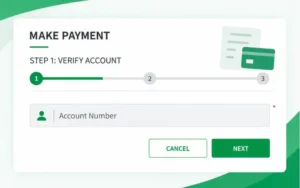
Provide the requested information and then go to the next step to verify the account.
The payment workflow used by SEWA reduces the need to go through the account verification process and payment details. This allows the customer to double-check that the payment is linked to the service account they intended to pay rather than a different one.
Step 5: Enter Payment Details
Once it has been verified, the available payment method should be used.
According to SEWA’s official payment page, customers can pay through different payment methods such as bank account, MasterCard, Visa, Discover, American Express, ATM card, and debit card.
The availability of a specific method may vary on the payment interface and the payment configuration set in the SEWA system. Use the options that are presented on the official page at the moment of making the payment.
Step 6: Review and Confirm the Transaction
Before you click on the last payment button, verify:
- Service account number
- Customer/contact information
- Amount being paid
- Payment method
- Card or bank information
- The information about any payment transactions displayed by the payment gateway.
SEWA’s payment page says sit back and make sure of all the information that you have provided, as it may cause issues in the transaction if provided incorrectly.
If all is in order, make the payment.
Step 7: Keep the Confirmation
After a successful transaction, keep the payment receipt or confirmation for records.
SEWA’s payment interface suggests that a confirmation is possible and can be sent to the email address provided.
It is important to keep the Confirmation if the money doesn’t show up in your account right away, or if you have to contact SEWA about a payment.
What Information Do You Need for SEWA Online Payment?
The primary contact number and service account number are the primary information needed for the official payment process at one time.
Your preferred payment method should be available as well.
To make the process smoother, have the bill that they just sent you with the previous information with you nearby so that you can compare it with the bill that was just received and the amount due before paying. In a SEWA bill, the number of the invoice, billing period, due date, account number, service charges, VAT, and total amount can be mentioned.
Do You Need to Log In?
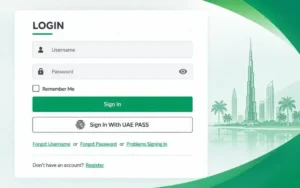
Not for the one-off payment method.
SEWA has a separate payment page, which includes account and contact verification, and a main e-services page, which includes account login for those who wish for more account-management features.
This is important because customers who may want to only pay a bill don’t necessarily have to use the full account dashboard.
Check Your SEWA Bill Before Paying?
Yes. SEWA has introduced an online service with a Bill Inquiry feature, and the customer portal has facilities to manage the utility services and pay bills.
If you don’t know the amount you owe, or if you find the numbers on the bill confusing, it’s a good idea to check the bill first.
The electricity, water, gas charges, and any other charges on the account are included in a SEWA bill, such as municipality charges, depending on the account. The SEWA statement has the service amounts and the municipal charges separately listed on the bill.
What Should You Check on the Bill?
Before paying:
- Account Number — check that it is the correct property’s number.
- Billing period — ensure that the bill is for the correct billing period.
- Due date – look at the date when the payment will be due.
- Current amount — check the most up-to-date costs.
- Review previous balances or arrears — see if there are any older balances or arrears due.
- Receipts and adjustments — make sure that payments or adjustments have been made and credited in the past.
- Total amount — enter the last balance from the statement.
This is particularly critical for landlords, property owners, and tenants who manage more than one utility account.
Other Ways to Pay a SEWA Bill
SEWA’s online payment service is not the only payment channel.
According to the current SEWA bill documents, there are several ways of payment, such as:
- SEWA Smart App
- SEWA website
- SEWA branch offices
- This is a bank or exchange centre. This is a bank or exchange centre.
- MBME kiosks
- Digital Sharjah App
Individual channels may be available,e and different procedures may be followed; customers should read the information provided by SEWA at the time to be sure that the information is accurate before using an outdated third-party guide.
SEWA Smart App
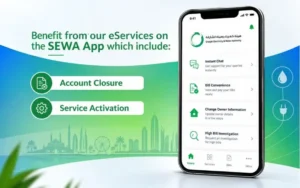
SEWA’s Smart App provides digital utility services. The official website takes customers to its app,p and the broader e-services platform enables bill management and payments.
This app may be helpful to SEWA customers who use their SEWA account regularly and desire access to the utility information from their mobile device.
Banks and Exchange Centres
The payment of SEWA bills can also be done via the approved banks and exchange channels. Currently, SEWA has a document on its bill llistingBanks & Exchange as a payment method.
When online card payment is not an option or a customer would prefer a face-to-face transaction,n this can be a viable option.
SEWA Branch Offices
Customers may be able to pay at SEWA service locations, too. The authority currently has several contact points for customers, such as Al Majaz, Industrial Area, Halwan,n and Budaniq.
Check the operating hours for each location, as some have varying hours. For instance, SEWA has made Halwa Customer Service Center available 24 hours a day and seven days a week for reconnection, payments, and enquiries.
MBME Kiosks and Digital Sharjah
Other methods of payment mentioned in SEWA’s current bill document are MBME Kiosks and the Digital Sharjah App.
These options may be helpful to customers who would rather self-serve or opt for another form of digital service.
SEWA Quick Payment vs Full Account Login
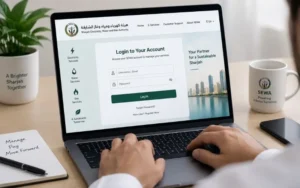
Customers sometimes mix up the two types of needs: making payments and managing an account.
The one-time payment service is targeted at completing a bill transaction. The primary portal, on the other hand, offers consumers and owners account-management functionality such as paying bills, access to consumption information, etc.
If you’re going to pay a bill, the payment page might be the obvious choice.
If you require to review consumption, manage account information, or access other e-services, you might want to log in to the main SEWA portal.
What If the SEWA Payment Fails?
If the transaction fails or you interrupt it, it doesn’t necessarily mean you’ve been charged the wrong amount. The initial step is to check if the payment has already been processed.
SEWA’s payment interface includes warnings about transactions, such as: Do not repeat payments or refresh a page if a payment is currently in progress, as that could lead to failure of the payment transaction or double charging.
If the Page Is Stuck
Avoid submitting the same payment over and over throughout.
First:
- Wait until the transaction is settled.
- Look for a confirmation; if it exists, then the transaction was successful.
- Review bank or card transaction statements.
- Check your SEWA account or bill status.
- If you are unsure about the payment status, please contact SEWA.
In cases where a payment is already in progress for the same account, the official payment system also shows the error and advises users not to try again.
If Your Card Is Declined
Make sure to review the card’s information, its expiration date, the amount available on the card, and whether the card is allowed for online use.
It accepts all major cards such as Visa, MasterCard, Discover, and American Express for payment.
If the bank refuses it, it might be necessary to reach out to the card issuer. If it seems that the problem is in the SEWA payment system, please reach out to SEWA directly.
If Mo Deducted but the Bill Is Not Updated
Don’t pay the same amount immediately next time.
Retain the bank transaction reference, payment confirmation, date, amount, and SEWA account number. Next, get in touch with SEWA customer service to investigate the transaction.
The official/contact page of SEWA provides 600 566665 as a number for customer queries and 991 for emergency numbers.
Is Online SEWA Payment Safe?
It is advisable to use SEWA’s official website and official e-services portal as opposed to any third-party payment links.
According to SEWA’s official payment page, payment information is only used for the purpose of transacting the payment, and a secure payment interface is provided.
While customers should be aware of online payment standard precautions, they should remember that:
- Make sure to use an official SEWA domain.
- Never give a card PIN or banking password to anyone.
- Don’t store payment details on public computers.
- Check the account number before making a payment.
- Don’t click on links in messages that are asking for money.
- Retain the receipt for your transaction.
At present, the official SEWA website offers direct access to the Quick Pay service under e-services.
Conclusion
SEWA Quick Pay will be a direct online platform for those customers who just want to pay their utility expenses in Sharjah. The process goes through the stages of account verification, payment details, and final confirmation, and the service account number and primary contact number must be provided at the start.
The most crucial point is that payment must be made through SEWA’s official website, and after the payment, the confirmation receipt must be kept. For those who require multiple payments, they can utilise SEWA’s broader e-services platform or Smart App, while other payment options are available through the branch offices, banks, exchange centres, MBME kiosks and Digital Sharjah.
Frequently Asked Questions
Can I pay my SEWA bill online?
Yes. SEWA provides its customers with an online utility bill payment facility on its e-services platform.
What do I need to make an online payment?
Usually, your SEWA service account number and registered contact number will be required to verify your account.
Can I pay SEWA with a debit card?
Yes. SEWA payment service enables debit cards and all major card networks (Visa, MasterCard, etc.).
Can I pay only part of my SEWA bill?
I cannot vouch for partial payments on all accounts. Review the payment options listed on your particular bill.
Can I pay my SEWA bill from outside the UAE?
The online payment service is accessible remotely, and international cards can be accepted based on the payment method and card issuer.
What should I do if I enter the wrong account number?
Please review all information before making payment. If payment has already been made, please get in touch with SEWA customer service at 600 566665.
What if my payment is stuck or fails?
Don’t submit the payment again and again. Please monitor the bank transaction status,s and if the status is not clear, contact SEWA.
